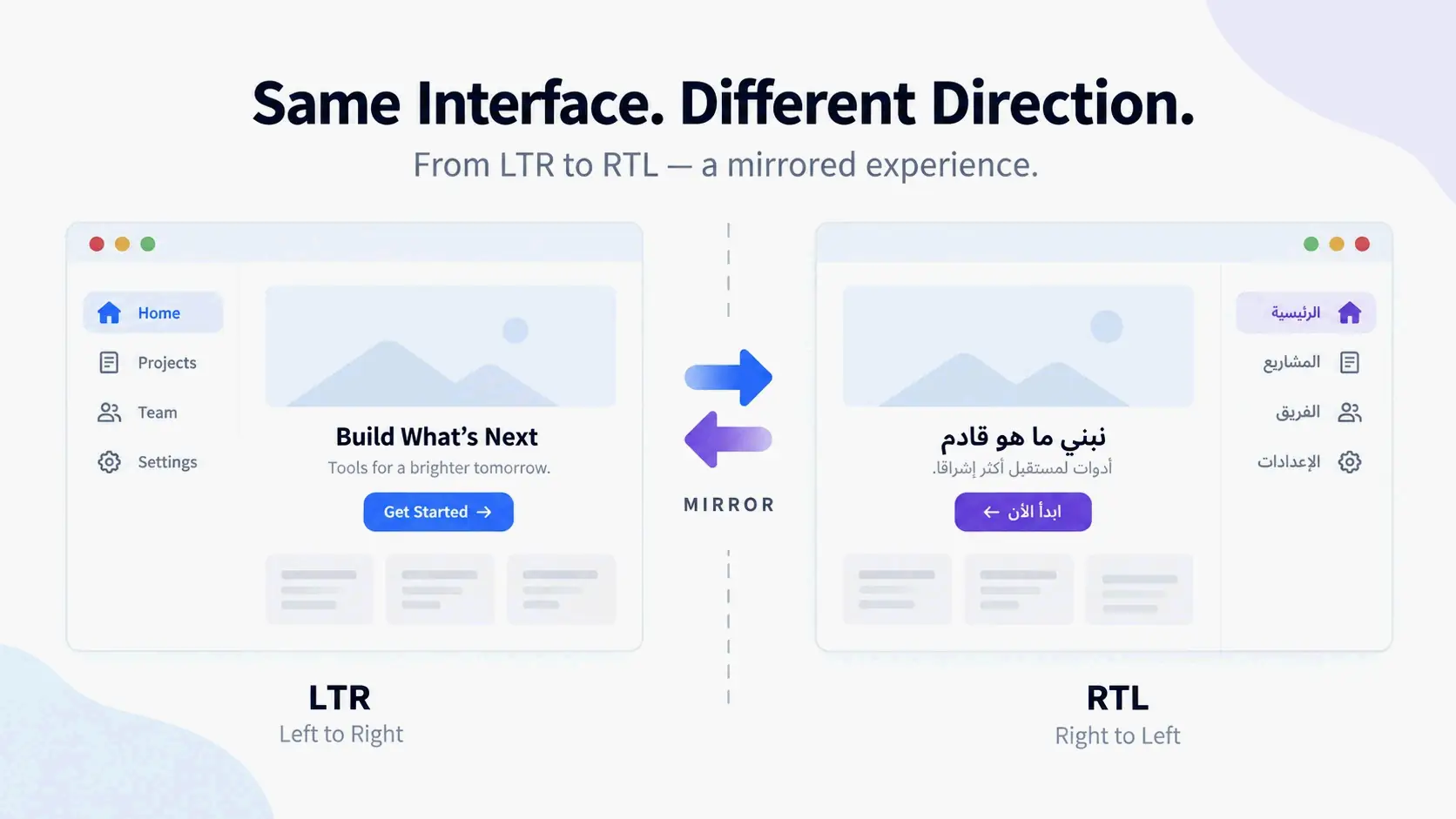
LTR to RTL: A Complete Conversion Checklist
To convert an interface from LTR to RTL, set dir="rtl" on the <html> element, replace physical CSS with logical properties like margin-inline-start, isolate numbers and URLs with <bdi> or dir="ltr", and then test with Arabic or Hebrew smoke locales. The five-layer checklist below walks through those changes in an order that cuts down on rework.
The 5-Layer LTR to RTL Conversion Checklist
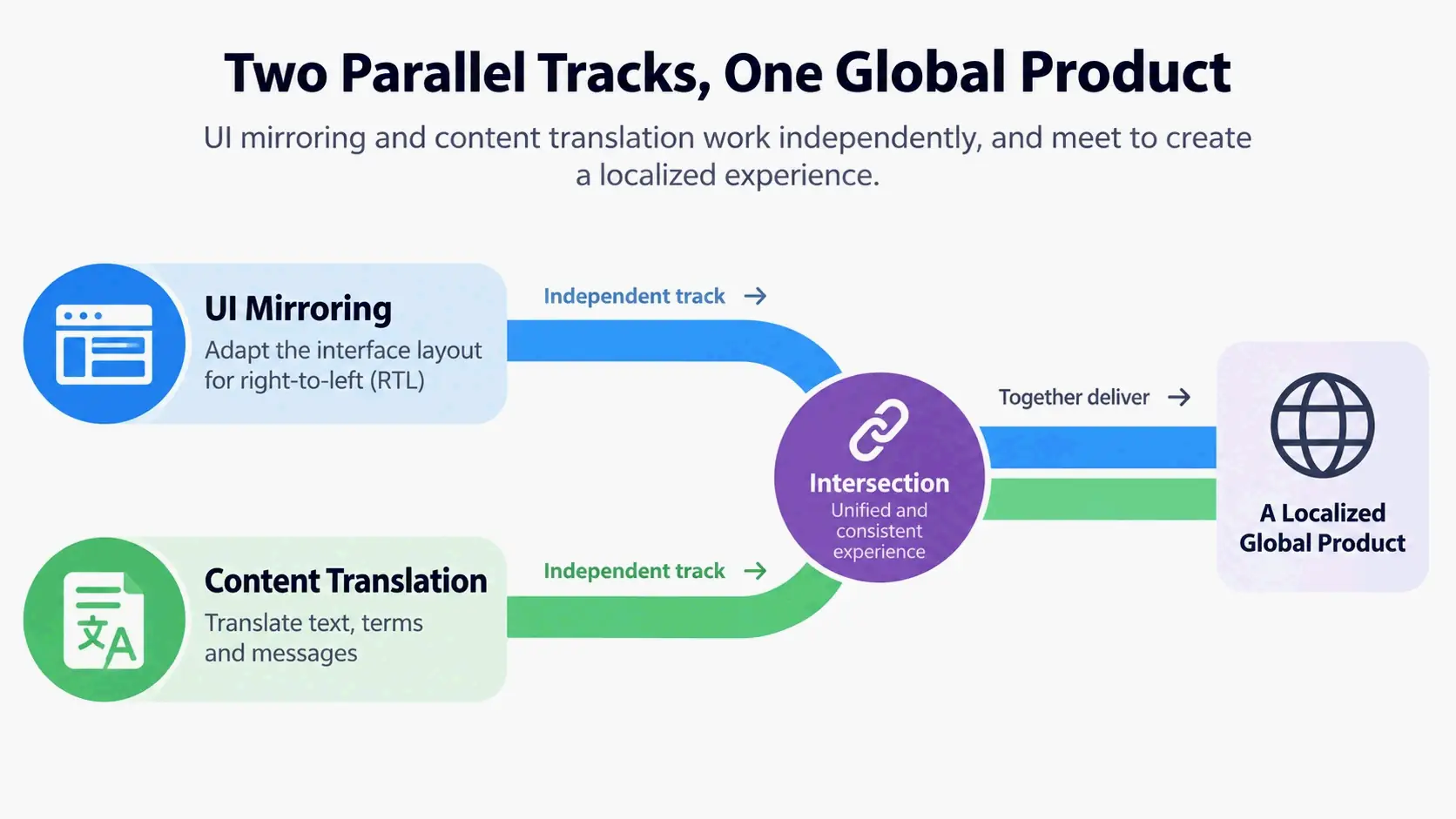
LTR to RTL conversion splits into two parallel tracks. UI mirroring covers layout, spacing, alignment, and directional indicators that need to flip from left to right. Content translation handles word order, labels, and data so meaning survives the new writing direction. Mixing these tracks is a common reason RTL interfaces break. Even a correctly mirrored page can become unusable if numbers, URLs, product codes, or brand names reorder inside translated sentences.
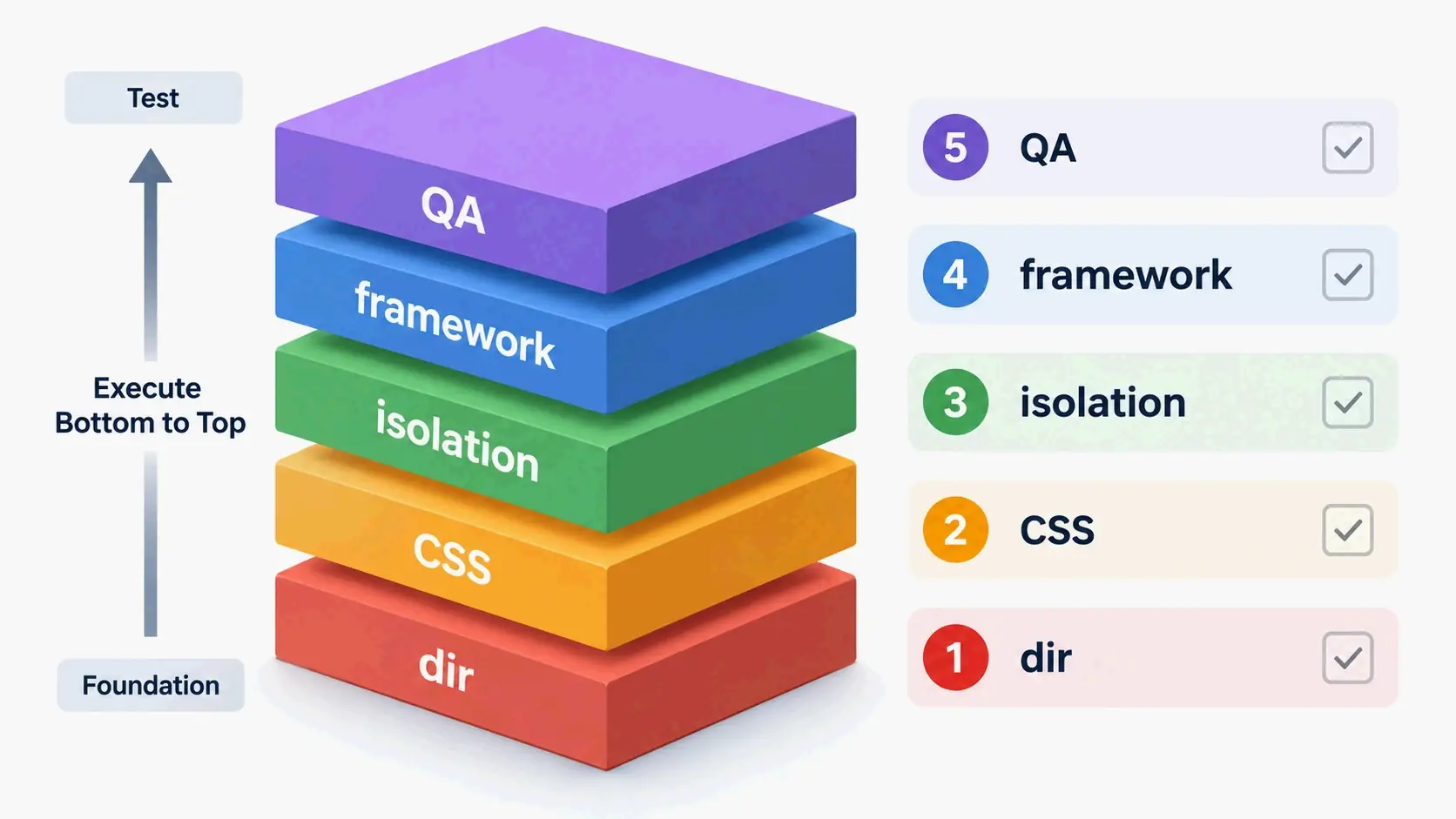
These five layers follow execution order, not a random checklist:
- HTML
dir— set the base direction on the document root. - CSS logical properties — replace physical
left/rightvalues withstart/endequivalents. - Mixed-content isolation — protect numbers, URLs, code, and brand strings from BiDi reordering.
- Framework and Tailwind implementation — audit components and map utilities to logical equivalents.
- QA and runtime testing — validate with Arabic/Hebrew/Persian locales and direction toggles.
This order keeps rework to a minimum because each later layer depends on the earlier ones. Setting base direction first shapes how all downstream CSS and content behave. Replacing physical styles before isolating mixed content avoids fixing the same spots twice. Testing last verifies the entire chain.
Two parallel tracks: UI mirroring vs. content translation
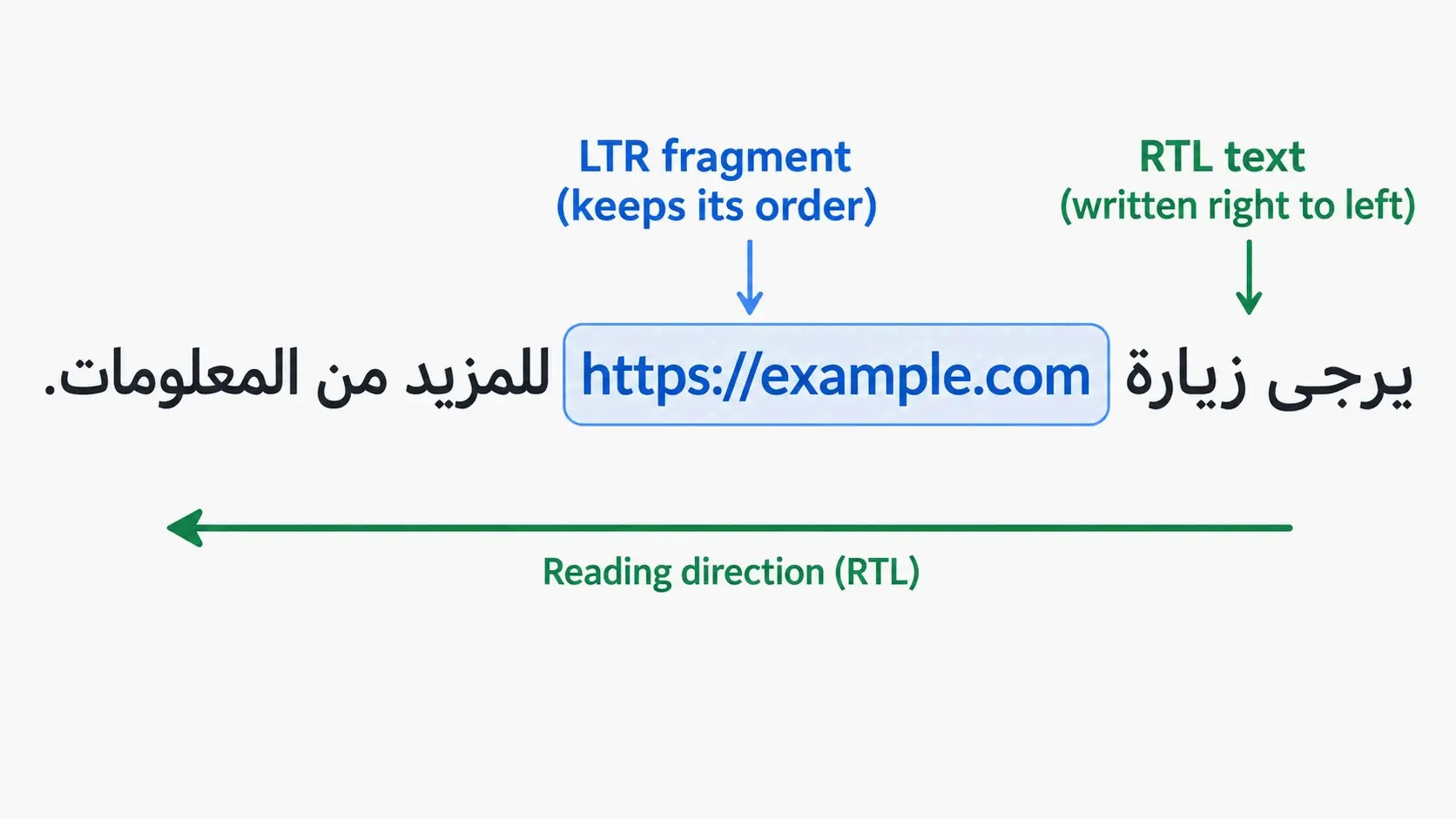
UI mirroring moves things in space: a sidebar switches sides, a back arrow becomes a forward arrow, and padding shifts to the leading edge. Content translation is about keeping meaning intact. A sentence may read right-to-left, but an embedded URL, phone number, or Latin brand name still has to keep its internal LTR order.
The two tracks overlap where translated prose meets protected data. That’s why directional runs—not whole paragraphs—are the right unit to watch. An RTL paragraph can contain LTR numbers, and an LTR paragraph can contain an RTL quotation or name.
Step 1: Set the Base Direction with the dir HTML Attribute
Start by adding dir="rtl" to the <html> element. The dir attribute sets the base text direction and passes down to all child elements. It also isolates direction in many cases, so embedded LTR fragments don’t bleed into surrounding text. If nothing sets a direction, the default is LTR. An RTL page without an explicit root dir will then lay out with the wrong baseline for Arabic or Hebrew.
The lang attribute is a separate thing. It declares the document language but does not set base direction. Leaving out dir also doesn’t turn on automatic detection. You have to set direction on your own.
Add dirname to form inputs when a submitted value might use a different direction than the page. The form can then send the input’s direction along with the value, which helps for user-generated names or comments.
Why lang=”ar” is not enough on its own
As MDN Web Docs notes: “Even for documents in a single script, it is recommended to explicitly set
diron the root element, which is especially important for RTL scripts, because the default LTR base direction is wrong. Thelangattribute declares the language, but does not imply the base direction.”
You can see the problem in punctuation. In an Arabic paragraph with only lang="ar" and no dir="rtl", the final period can end up on the wrong visual edge because the paragraph still inherits LTR. The same text with dir="rtl" puts the period on the right, where readers expect it.
When to use dir=”auto” for user-generated content
Use dir="auto" when you don’t know the direction ahead of time—user comments, names, or external data. The browser picks the base direction from the first character with strong directionality, skipping items like <bdi>, <script>, <style>, <textarea>, and elements that already have a valid dir. MDN warns that auto is a heuristic, not language detection. A comment that starts with an English name and then continues in Arabic will get an LTR base direction.
For inline fragments, <bdi> gives the same effect as dir="auto" and is shorter when no semantic element fits. Use an explicit dir whenever you already know the direction.
Step 2: Replace Physical CSS Properties with Logical Properties
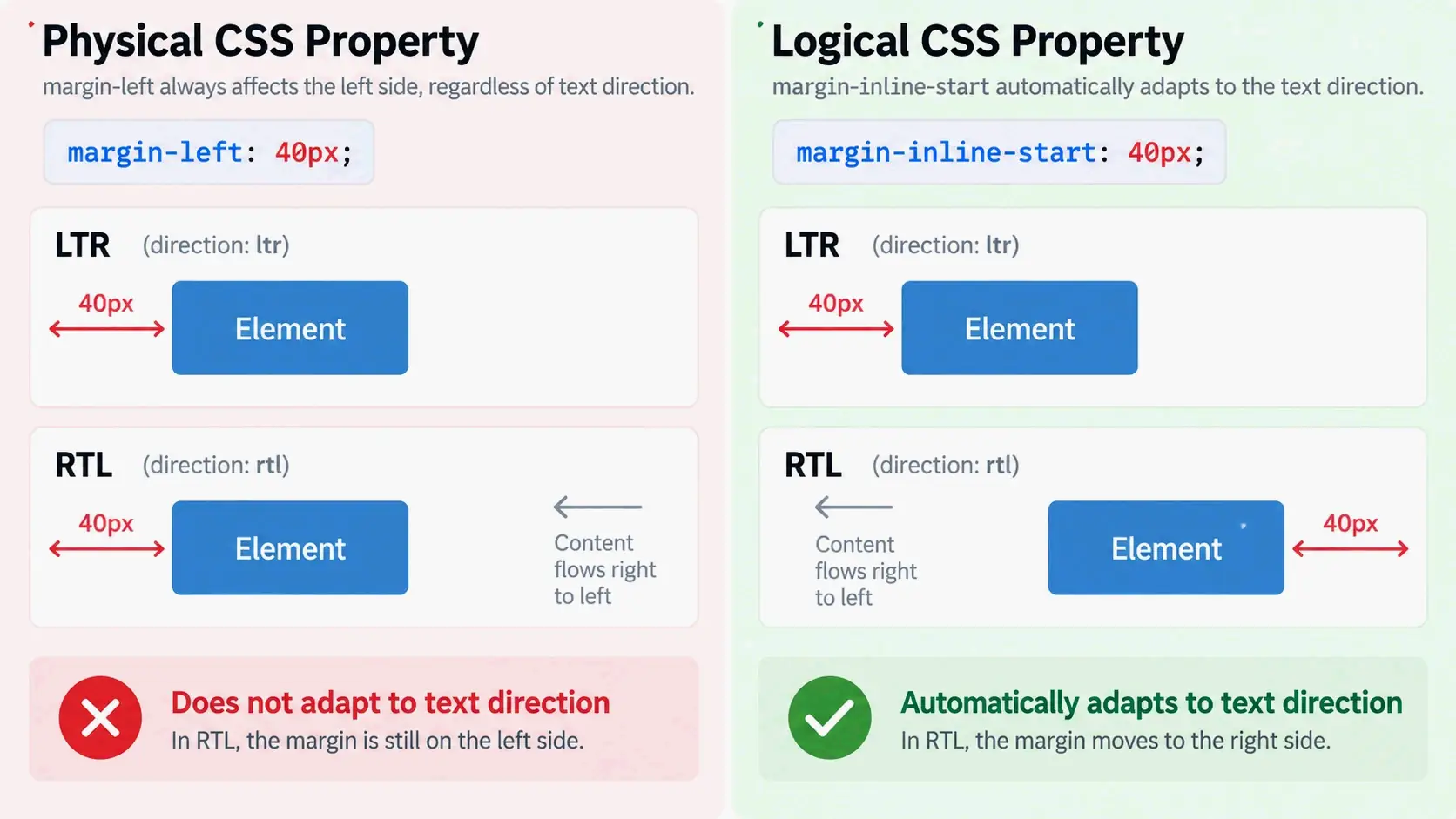
Replace physical CSS values with logical ones so the layout responds to writing direction on its own. Physical properties like margin-left, padding-right, left, right, border-left, and text-align: left each hard-code one direction. Logical properties describe the start and end of the reading flow, so the same rule works in both LTR and RTL without extra overrides.
Logical properties are the backbone of runtime direction toggling. When dir flips from ltr to rtl, margin-inline-start moves to the right side automatically. margin-left stays pinned to the left, so it needs a separate override.
Physical vs. logical: the RTL-ready replacement map
Replace physical properties with their inline equivalents:
| Physical property | Logical equivalent |
|---|---|
margin-left |
margin-inline-start |
margin-right |
margin-inline-end |
padding-left |
padding-inline-start |
padding-right |
padding-inline-end |
left |
inset-inline-start |
right |
inset-inline-end |
text-align: left |
text-align: start |
text-align: right |
text-align: end |
border-left |
border-inline-start |
border-right |
border-inline-end |
The same idea applies to border radius. Use border-start-start-radius and border-start-end-radius instead of border-top-left-radius and border-top-right-radius when the design needs direction awareness.
Tailwind logical utilities: ms-, me-, ps-, pe-, start-, end-
Tailwind maps physical utilities straight to logical properties:
ml-*→ms-*(margin-inline-start)mr-*→me-*(margin-inline-end)pl-*→ps-*(padding-inline-start)pr-*→pe-*(padding-inline-end)left-*→start-*right-*→end-*text-left/text-right→text-start/text-endrounded-l-*/rounded-r-*→rounded-s-*/rounded-e-*border-l-*/border-r-*→border-s-*/border-e-*
Auditing a component with these replacements is mostly mechanical: find each physical utility and swap in its logical equivalent. The harder part is spotting absolute positioning, transforms, and JavaScript-driven geometry that also assume an LTR layout.
Step 3: Isolate Mixed-Direction Content with <bdi>, <bdo>, and unicode-bidi: isolate
Wrap numbers, URLs, code, brand names, phone numbers, and other LTR fragments inside RTL text with <bdi> or an element that has dir="ltr". That keeps the Unicode Bidirectional Algorithm from reordering them into a sequence that’s hard to read or breaks copy-paste.
<bdo> is different. It requires an explicit dir and overrides the characters’ intrinsic directionality, not just the base direction. Use it only when you need to force an unusual visual order—not for routine URL or number isolation.
How the Unicode Bidirectional Algorithm (UAX #9) orders mixed text
The Unicode Bidirectional Algorithm classifies characters into strong, weak, neutral, and explicit formatting types. Strong characters—Latin, Arabic, and Hebrew letters—set the direction. Weak characters like European digits, currency symbols, and arithmetic symbols have vague direction. Neutral characters like spaces, punctuation, and paragraph breaks depend on context. Explicit formatting characters let the algorithm change the default order.
According to the Unicode Bidirectional Algorithm’s character type table as of Unicode 16.0 (2026), text falls into 22 bidirectional character types, and the algorithm defines twelve Bidi_Control formatting characters. Unicode 6.3, released in 2013, added isolate directional formatting characters—LRI, RLI, FSI, and PDI—as the recommended replacement for older embedding controls like LRE, RLE, and PDF. The older embeddings bled direction too strongly into surrounding text. Isolates keep a fragment from affecting order outside its scope.
Modern isolates, including CSS unicode-bidi: isolate, do the same thing at the CSS level. They’re preferred over legacy embeddings because they contain directional effects cleanly.
When to force LTR for URLs, code, numbers, and xterm.js content
Force LTR for anything whose internal order must not change. URLs, email addresses, file paths, version numbers, keyboard chords, and source code are data-like strings, not prose. A URL displayed in RTL order gets hard to read and may break copy-paste. Numbers do stay LTR inside RTL text because digits are weak LTR characters under the algorithm, but wrapping them in dir="ltr" removes ambiguity when punctuation sits nearby.
Terminal content is a special case. The xterm.js terminal is byte-oriented, and its output needs to stay LTR no matter what direction the surrounding UI uses. Wrap the terminal container with dir="ltr" and leave its content alone. Do the same for monospace preview blocks, code blocks, and command output inside an otherwise RTL interface.
Step 4: Implement RTL in Your Framework and Tailwind
Audit every component that assumes an LTR layout. Sidebars, tabs, modals, toasts, step indicators, form labels, and progress bars all carry directional meaning. The audit should flag three things: physical utilities that need logical replacements, icons that should mirror, and components whose JavaScript geometry depends on left or offsetLeft.
The Agentrium issue for full RTL support shows a typical scoped audit for an Electron/Tauri app. The plan keeps the default UI at LTR and adds an explicit uiDirection: 'ltr' | 'rtl' | 'auto' setting. It maps Tailwind ml-*/mr-* to ms-*/me-*, converts left-*/right-* to start-*/end-*, mirrors directional chevrons and progress bars, and wraps terminal content in dir="ltr" because terminal output must not flip. The same checklist shows up across frontend projects: audit components, convert utilities, then test the RTL and LTR states side by side.
React Native: I18nManager.forceRTL() and why restarts are still the norm
React Native uses I18nManager.forceRTL(true) before app bootstrap to set the layout direction. Calling it at runtime usually requires an app restart or at least a full re-render, because the native layout infrastructure initializes in one direction. Android and iOS can behave differently, so the fixi project’s RTL phase plans to test restart behavior on both platforms and handle the in-between state with a splash screen or forced-restart prompt.
Use I18nManager.isRTL to read the current direction and style components with logical layout props instead of hard-coded left or right positions. The key point: forceRTL is not a live toggle. Treat it as a startup configuration choice.
Auditing components: sidebars, tabs, modals, and terminal chrome
An audit should walk these component categories:
- Sidebars — the sidebar moves to the opposite side; internal search icons and dividers need mirroring.
- Tabs — tab order reverses visually, and any sliding indicator must follow the active tab.
- Modals and forms — labels align to the leading edge; primary action buttons sit on the leading side in RTL.
- Toasts and notifications — position settings flip, but the message text direction should follow the content.
- Terminal chrome — tabs, close buttons, and search fields mirror while terminal content stays LTR.
For each component, the pass is: replace physical utilities, mirror directional icons, then check the component with a temporary RTL locale instead of waiting for full translation.
Step 5: Test with Arabic, Hebrew, and Persian Smoke Locales
Use Arabic, Hebrew, and Farsi as smoke locales before translation is complete. They exercise different RTL script shapes and surface layout bugs that LTR placeholder text can’t show. The vortex-frontend RTL issue recommends a pseudo or RTL smoke locale—an ar minimal catalog or an automatically mirrored en—selectable in dev and Storybook, with dir set on <html>. This catches directional utility mistakes without waiting for professional translation.
Smoke locales and pseudo-RTL testing
A pseudo-RTL locale mirrors the existing English strings and sets dir="rtl" so developers can see layout breaks before real Arabic or Hebrew copy exists. It’s faster than full translation and catches physical-utility leaks, icon problems, and alignment bugs early.
Pseudo-localization has limits. It doesn’t test Arabic shaping, line-breaking rules in Perso-Arabic scripts, or copy-paste behavior with real mixed-direction strings. Treat pseudo-RTL as a first gate, then follow it with real Arabic or Hebrew strings for any user-facing release.
Manual QA checks that catch direction-specific bugs
Manual QA should cover keyboard navigation, scrollbar positions, copy-paste, and screenshot regression. The eduKate RTL translation guide recommends a native-reader QA pass: ask a fluent target-language reader to do the task the text supports—copy a URL, dial a phone number, follow a step, enter a code, or navigate a menu. Copy-paste tests matter a lot because a line can look correct while its stored order is wrong.
Add these items to the QA checklist:
- Tab and arrow-key order under RTL.
- Scrollbar position and overflow direction.
- Copy-paste of URLs, emails, and codes.
- Screenshot regression on sidebars, grids, modals, and forms.
- Visual grouping of punctuation around mixed-direction strings.
Runtime Direction Toggling: Fixing Stale Layouts and Hidden Bugs
Changing dir dynamically doesn’t automatically reposition JavaScript-dependent components. The browser reflows text and logical CSS, but values like offsetLeft, transforms, scroll positions, and inline left styles stay stale until you recalculate them.
Why changing dir at runtime breaks tabs, transforms, and offsetLeft
The sv5ui Tabs bug shows exactly how this fails. In an LTR render, the active tab’s offsetLeft was 40px, and the sliding indicator’s style.left matched. After switching to RTL, the same active tab’s offsetLeft changed to 255px, but the indicator stayed at 40px. The tab triggers mirrored correctly; only the indicator was stale.
The cause was structural. The indicator update function recalculated from offsetLeft and offsetWidth, but it only ran from an effect reading value, orientation, and items, plus a resize observer on the list element. A direction change altered every trigger’s offsetLeft without changing those tracked values or the list size, so nothing fired.
This bug category isn’t limited to tabs. Absolute positioning, tooltip collision logic, transform: translateX animations, and scroll-to-item calculations all depend on measured geometry. They need a direction-change signal to recompute.
MutationObserver vs. getComputedStyle direction checks
Two repair patterns work for the stale-indicator problem. The first observes the dir attribute with a MutationObserver (attributes: true, attributeFilter: ['dir']) on document.documentElement and on every ancestor that carries a dir attribute, then schedules a geometry update. The sv5ui issue notes this is the reliable signal.
The second compares getComputedStyle(listEl).direction with the last seen value inside the update function. That catches direction changes made purely through CSS, such as a class toggle that sets direction: rtl, which a dir-only observer would miss. Using both covers page-level attribute toggles and style-level overrides.
Unicode BiDi Deep Dive: direction, unicode-bidi, and Security
CSS direction controls layout direction, but it doesn’t reorder text on its own. The actual reordering comes from the Unicode Bidirectional Algorithm. The dir attribute or unicode-bidi property influences that algorithm by setting base direction, embedding, isolating, or overriding text runs.
CSS direction vs. dir attribute vs. unicode-bidi: precedence and use cases
The HTML dir attribute is the recommended base direction control because direction is tied to content meaning, not just presentation. MDN Web Docs states that dir can be overridden by CSS direction and unicode-bidi when a CSS page is active, but the attribute is still preferred because text displays correctly even without CSS.
Use CSS direction only when layout needs a style-level override that doesn’t change content semantics. Use unicode-bidi: isolate or unicode-bidi: embed for CSS-level bidi handling when markup wrappers aren’t practical. For inline HTML, prefer <bdi>, <bdo>, or a dir attribute on the smallest relevant element.
Trojan Source: why highlighting bidi controls is still a 2026 baseline
Trojan Source is a class of vulnerability that uses invisible BiDi override characters to make malicious code look benign to a human reviewer. The bidirectional controls can reverse the visual order of tokens in source files without changing the logical order the compiler sees.
Visual Studio Code has highlighted BiDi control characters since version 1.62, released in October 2021, and Visual Studio since version 17.0.3, released December 14, 2021. These controls are still part of Unicode 16.0 (2026), so highlighting and review hygiene remain a practical baseline for code editors—not a one-time fix.
When to Force LTR Instead of Mirroring
Not every RTL-language user needs a fully mirrored UI. Some users prefer LTR layouts for consistency, especially in technical tools where terminals, code, and dense data dominate. Mirroring should follow meaning—not become a default for every RTL locale.
When force-LTR is the right choice
Force LTR when mirroring would actively hurt the user or the content. Terminal output in xterm.js, code blocks, file paths, URLs, version numbers, keyboard chords, and brand assets should stay LTR even inside an RTL interface. Some product surfaces are intentionally direction-agnostic. For example, the crop rectangle in an image editor can stay in the same pixel coordinates while the property panel moves to the other side, as described in the eduKate selection controls guide.
User preference is another valid reason. The piko-newx issue asks for a toggle to keep the UI in LTR while still showing Arabic text, because some users prefer standard LTR alignment regardless of the selected app language. A force-LTR setting should be opt-in, not the default for a full RTL locale.
How to force LTR without breaking accessibility
Use dir="ltr" on specific containers to override inherited RTL. Avoid a blanket global force unless user preference or technical constraints really justify it. That way Arabic or Hebrew fragments inside the LTR container still shape correctly when you wrap them with dir="rtl" or <bdi>.
Don’t force LTR on user-generated text fields where input direction should match the user’s language. Keep focus order and keyboard navigation predictable, and test that forced-LTR containers don’t trap RTL text in a way that breaks screen readers or copy-paste.
Conclusion
A reliable LTR to RTL conversion is a layered process: explicit base direction, logical CSS, mixed-content isolation, and direction-aware testing. Start with dir on <html>, replace one group of physical properties at a time, wrap user content with <bdi> or dir="ltr" isolation, and test with Arabic or Hebrew smoke locales before release. Runtime direction changes need their own layer because JavaScript-measured geometry can go stale. The goal isn’t just a mirrored UI—it’s one that preserves numbers, URLs, code, and directional meaning throughout.
FAQ
Can I keep the UI in LTR layout while still displaying Arabic or Hebrew text?
Yes. Set dir="ltr" on <html> and add dir="rtl" or <bdi> around the Arabic or Hebrew fragments. That keeps the layout LTR while still letting RTL text shape correctly. It’s acceptable for user preference, but don’t make it the default for full RTL locales.
Should numbers be reversed when a paragraph is in RTL?
No. Numbers stay LTR inside RTL text because the Unicode BiDi algorithm treats digits as weak LTR characters. Wrap phone numbers, product codes, or account numbers in <bdi> or dir="ltr" to prevent reordering at punctuation boundaries.
Should URLs be translated or displayed in RTL?
Don’t translate URLs. Keep the original URL string and wrap it in <bdi> or dir="ltr". Showing a URL in RTL order makes it unreadable and breaks copy-paste. Translate only the surrounding link text where appropriate.
Do all arrows and icons need to be mirror-flipped in RTL interfaces?
No. Mirror only directional icons like back/forward arrows and progress indicators. Non-directional icons—search, home, settings—stay the same. Before mirroring, check whether the icon represents navigation direction or physical orientation.
How does React Native handle RTL layout switching, and does it require an app restart?
React Native uses I18nManager.forceRTL(true) before app bootstrap. Calling it at runtime usually requires an app restart or at least a re-render. Android and iOS can behave differently, so test restart behavior on both. Use I18nManager.isRTL to read the current direction and style with logical layout props.
SectoJoy
• Indie Hacker & DeveloperI'm an indie hacker building iOS and web applications, with a focus on creating practical SaaS products. I specialize in AI SEO, constantly exploring how intelligent technologies can drive sustainable growth and efficiency.