Temperature Converter Guide: Formulas, Calibration, and Scale Reference
Convert between Celsius, Fahrenheit, and Kelvin using these core formulas: °F = (°C × 1.8) + 32, °C = (°F − 32) / 1.8, K = °C + 273.15. For hardware accuracy, calibrate digital thermometers with the Ice Point Method (0°C / 32°F) at least weekly.
Core Conversion Formulas
| From | To | Formula | Example |
|---|---|---|---|
| Celsius | Fahrenheit | °F = (°C × 1.8) + 32 | 40°C = (40 × 1.8) + 32 = 104°F |
| Fahrenheit | Celsius | °C = (°F − 32) / 1.8 | 68°F = (68 − 32) / 1.8 = 20°C |
| Celsius | Kelvin | K = °C + 273.15 | 25°C = 298.15 K |
| Fahrenheit | Kelvin | K = (°F − 32) / 1.8 + 273.15 | 32°F = 273.15 K |
| Celsius | Rankine | °R = (°C × 1.8) + 491.67 | 0°C = 491.67 °R |
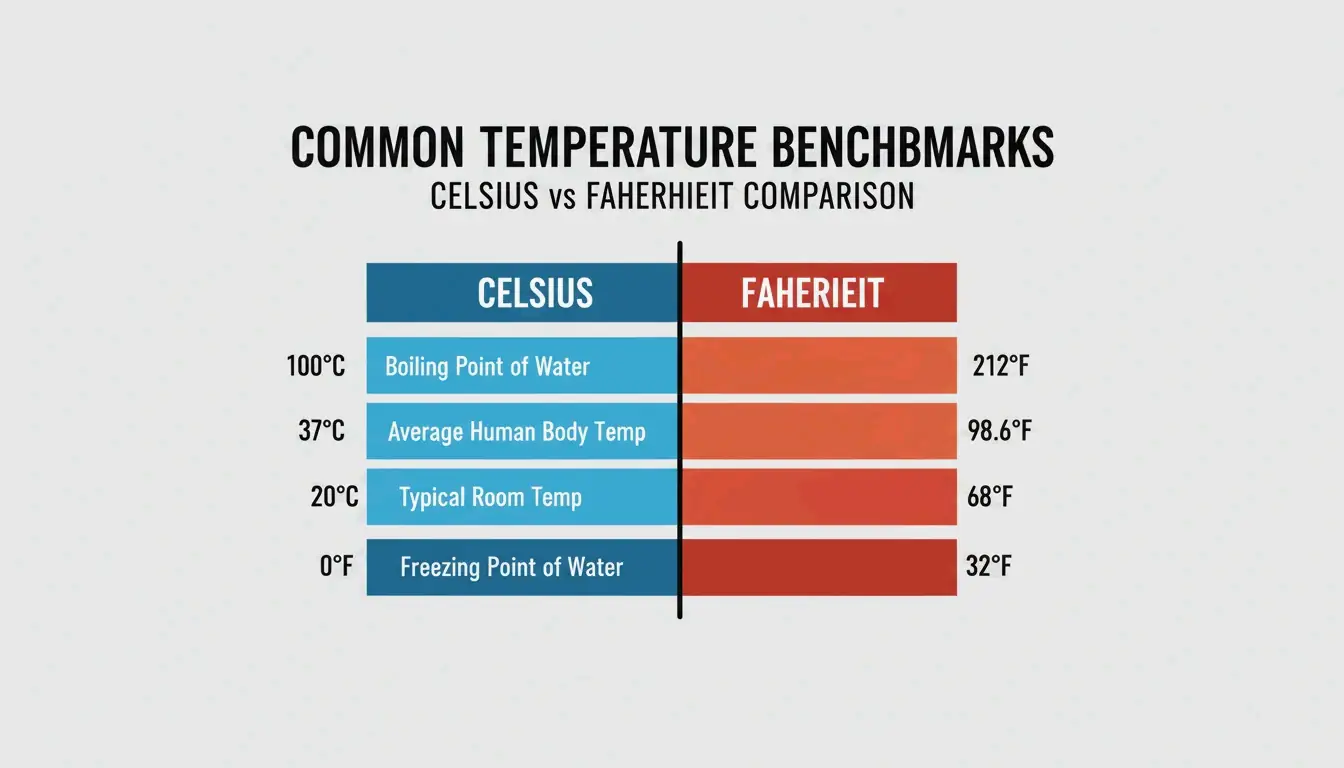
Key Temperature Benchmarks
| Point | Celsius | Fahrenheit | Kelvin |
|---|---|---|---|
| Water freezes | 0°C | 32°F | 273.15 K |
| Room temperature | 20°C | 68°F | 293.15 K |
| Body temperature | 37°C | 98.6°F | 310.15 K |
| Water boils (sea level) | 100°C | 212°F | 373.15 K |
Mental Shortcuts for Quick Estimates
When you need a fast estimate without a calculator:
Quick & Dirty: Double the Celsius and add 30.
| Actual | Shortcut | Error |
|---|---|---|
| 20°C = 68°F | (20 × 2) + 30 = 70°F | +2°F |
| 30°C = 86°F | (30 × 2) + 30 = 90°F | +4°F |
| 10°C = 50°F | (10 × 2) + 30 = 50°F | 0°F |
Adequate for weather and travel decisions. Use the exact formula (C × 1.8) + 32 for cooking, science, or medical contexts.
For digital conversion, browser-based tools like FastTool Temperature Converter handle all four scales (Celsius, Fahrenheit, Kelvin, Rankine) instantly. The Tootoolz Temperature Converter works offline — useful for remote sites and flights.
Thermometer Calibration: The Ice Point Method
Digital thermometers drift over time due to battery drain or physical impact. The Ice Point Method is the standard calibration procedure.
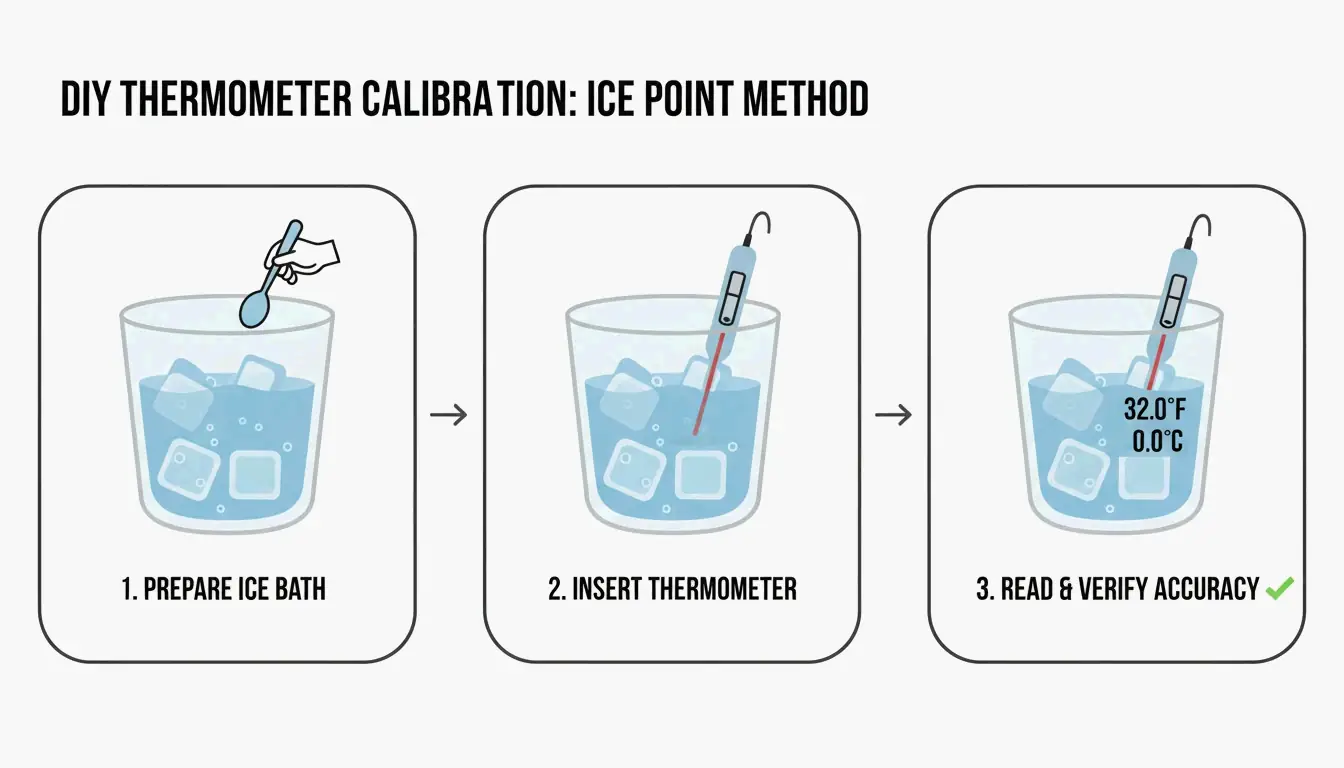
Steps (per Paddl):
- Fill a tall glass with crushed ice, add cold water to fill gaps.
- Stir for 30 seconds to reach thermal equilibrium.
- Insert the probe into the center — do not touch sides or bottom.
- Expected reading: 32°F (0°C). If off by more than ±1.8°F (±1°C), adjust the calibration offset.
Calibration frequency: Weekly for daily-use kitchen thermometers. Immediately after dropping the device or exposing it to extreme temperature swings (e.g., blast freezer → hot oven). Professional kitchens must maintain a calibration log for health inspections.
For professional-grade accuracy, use NIST-Traceable devices — accuracy certified against the National Institute of Standards and Technology. As Helen Rosner reported in The New Yorker, an oven just 25°F off from its display can ruin an entire baking session.
Tool Selection by Use Case
| Use Case | Recommended Tool | Accuracy | Key Feature |
|---|---|---|---|
| Weather/travel | FastTool (browser) | Exact | All 4 scales, instant |
| Professional kitchen | Thermapen ONE | ±0.5°F | 1-second reading |
| Remote/offline | Tootoolz (mobile app) | Exact | Works without internet |
| Lab/scientific | NIST-Traceable probe | ±0.1°F | Certified calibration |
| PC hardware tuning | AMD Ryzen Master | Real-time | CPU throttling alerts |
As Dr. Elena Marquez from EastWest Studios notes: “Temperature accuracy is not just a detail — it’s a safety imperative.” This applies equally to HACCP food safety standards and PC thermal management. Club386 reports that AMD Ryzen Master’s Curve Optimizer reduced power consumption by 18.8% while boosting performance by over 5%.
Programmable Thermostats and Energy Savings
The U.S. Department of Energy reports that setting a programmable thermostat back 7°–10°F for 8 hours per day saves up to 10% annually on heating and cooling.
| Season | Setting | When |
|---|---|---|
| Winter (awake) | 68°F–70°F (20°C–21°C) | While home |
| Winter (asleep/away) | 58°F–60°F (14°C–16°C) | 8+ hours |
| Summer (home) | 78°F (26°C) | While home |
| Summer (away) | 85°F+ (29°C+) | While out |
Note: Heat pump systems require specialized “setback” thermostats to maintain efficiency during temperature recovery.
Conclusion
Use the exact formulas for precision work, the “double and add 30” shortcut for weather estimates, and calibrate hardware thermometers weekly with the Ice Point Method. For digital conversion, bookmark a reliable tool like FastTool. For energy savings, a programmable thermostat with a 7°–10°F setback during unoccupied hours delivers measurable annual savings.
FAQ
How do I calibrate a digital food thermometer?
Fill a tall glass with crushed ice and cold water. Stir for 30 seconds. Insert the probe into the center without touching sides or bottom. Adjust the calibration until the display reads 32°F (0°C). Recalibrate weekly or immediately after dropping the device.
What is the fastest mental estimate for Celsius to Fahrenheit?
Double the Celsius and add 30. Example: 20°C → (20 × 2) + 30 = 70°F (actual: 68°F). Accurate within ±4°F for temperatures between 0°C and 40°C. Not suitable for cooking or scientific use.
Is 13°C considered cold?
13°C (55.4°F) is “cool” or “fresh” — typical spring or autumn weather. Comfortable for walking with light layers: T-shirt plus a cardigan, light jacket, or overshirt, with full-length trousers.
SectoJoy
• Indie Hacker & DeveloperI'm an indie hacker building iOS and web applications, with a focus on creating practical SaaS products. I specialize in AI SEO, constantly exploring how intelligent technologies can drive sustainable growth and efficiency.